
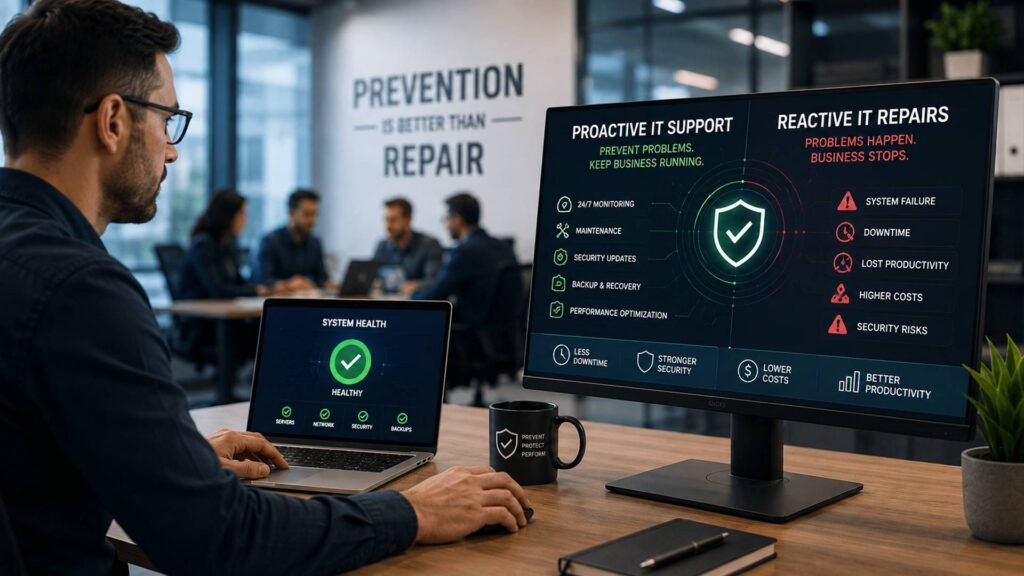
Many businesses still manage technology with a reactive approach. Something breaks, employees lose access, productivity stops, and IT teams are called in to fix the problem.
While this approach may seem simple, it often leads to higher costs, longer downtime, and increased security risks.
In 2026, businesses rely on technology more than ever. Cloud platforms, cybersecurity tools, remote work systems, and digital applications are essential for daily operations.
Waiting for IT problems to happen is no longer enough.
Proactive IT support helps businesses identify risks early, prevent failures, and maintain reliable technology environments.
By working with a managed service provider (MSP), organizations can move from emergency repairs to strategic IT management.
Quick Answer: What Is Proactive IT Support?
- Proactive IT support focuses on preventing technology problems before they disrupt business operations.
- It uses monitoring, maintenance, security tools, and expert planning to reduce IT failures.
- Unlike reactive IT repairs, proactive support identifies risks before they become costly problems.
- Businesses benefit from improved uptime, stronger cybersecurity, and predictable IT costs.
- MSPs provide proactive IT support through continuous monitoring and ongoing optimization.
What Is Proactive IT Support?
Proactive IT support is an approach where technology issues are identified and resolved before they impact business operations.
Instead of waiting for systems to fail, IT providers continuously monitor, maintain, and improve technology environments.
A proactive IT strategy includes:
- 24/7 system monitoring
- Regular maintenance
- Security updates
- Backup management
- Performance optimization
- Network improvements
- Technology planning
Traditional IT repair focuses on solving problems after they occur.
For example, a reactive approach addresses a server failure after employees lose access to important systems.
A proactive approach monitors server performance, detects warning signs, and fixes issues before users experience disruption.
This difference can significantly impact business productivity and operational stability.
Why Proactive IT Support Matters in 2026
Technology environments are becoming more complicated every year.
Businesses must manage cybersecurity threats, cloud systems, remote employees, and increasing technology expectations.
Cybersecurity Threats Are Increasing
Cybercriminals continue developing new methods to attack businesses.
Common threats include:
- Ransomware
- Phishing attacks
- Malware
- Data theft
- Credential compromise
Reactive IT support often responds after an attack has already caused damage.
Proactive IT support focuses on prevention through:
- Security monitoring
- Vulnerability management
- Employee security training
- Access controls
- Threat detection
Businesses Depend on Cloud Technology
Cloud applications allow businesses to operate efficiently, but they require ongoing management.
Poor configuration, outdated permissions, or security gaps can create problems.
Proactive IT support helps businesses maintain:
- Secure cloud access
- Reliable applications
- Proper user permissions
- Data protection
Downtime Is More Expensive
Even a short outage can impact:
- Employee productivity
- Customer service
- Revenue
- Business reputation
Preventing downtime is often more affordable than recovering from it.
Technology Requires Continuous Improvement
Businesses cannot rely on outdated systems.
Proactive IT providers help organizations identify:
- Technology improvements
- Security upgrades
- Process automation opportunities
Proactive IT Support vs Reactive IT Repairs
Reactive IT Repairs
Reactive IT support follows a break-fix model.
The process usually looks like:
- A problem occurs
- Employees report the issue
- IT investigates
- Repairs are completed
This approach creates uncertainty because businesses only respond after damage occurs.
Common problems include:
- Unexpected expenses
- Longer downtime
- Lost productivity
- Repeated technology failures
Proactive IT Support
Proactive support focuses on prevention.
The process includes:
- Monitoring systems
- Identifying risks
- Applying fixes
- Improving performance
Benefits include:
- Fewer outages
- Better security
- Faster issue resolution
- Predictable IT management
Key Benefits of Proactive IT Support
Reduced Downtime
Continuous monitoring helps detect problems early.
Examples include:
- Storage issues
- Hardware failures
- Network problems
- Software errors
Fixing small issues before they become major failures protects business productivity.
Improved Cybersecurity
Cybersecurity requires ongoing attention.
Proactive IT support includes:
- Security updates
- Threat monitoring
- Endpoint protection
- Backup verification
This reduces exposure to cyber threats.
Lower IT Costs
Emergency repairs are often expensive.
Proactive support reduces costs by preventing major failures and improving system efficiency.
Better Employee Productivity
Employees perform better when technology works reliably.
Less time is spent dealing with:
- Slow systems
- Login problems
- Software issues
- Network failures
Strategic Technology Planning
MSPs help businesses make smarter technology decisions.
Instead of reacting to problems, companies can plan improvements that support growth.
Risks of Ignoring Proactive IT Support
Increased Downtime
Without monitoring and maintenance, businesses are more likely to experience unexpected failures.
Security Vulnerabilities
Outdated systems and weak security controls create opportunities for attackers.
Higher Emergency Costs
Unexpected repairs often cost more than preventive maintenance.
Poor Technology Decisions
Without expert guidance, businesses may invest in solutions that do not support their goals.
Customer Impact
Technology failures can affect customer satisfaction and trust.
How Proactive IT Support Works
Monitoring
MSPs continuously monitor:
- Networks
- Devices
- Servers
- Applications
- Security systems
Maintenance
Regular maintenance keeps systems stable.
This includes:
- Software updates
- Security patches
- Performance improvements
Security Management
Proactive IT providers protect systems through layered cybersecurity strategies.
Backup Management
Regular backup testing ensures businesses can recover from unexpected events.
Optimization
Technology performance is reviewed and improved over time.
MSP Solution Layer: How Managed IT Providers Deliver Prevention
A managed service provider helps businesses build a proactive technology environment.
MSPs provide:
24/7 Monitoring
Systems are monitored continuously to detect issues early.
Expert IT Support
Businesses gain access to experienced professionals.
Enterprise-Level Tools
MSPs use advanced platforms for:
- Monitoring
- Security
- Automation
- Backup management
Strategic Guidance
Providers help businesses align technology with business goals.
Step-by-Step Framework: Building a Proactive IT Strategy
Step 1: Assessment
Review the current technology environment.
Identify:
- Existing systems
- Performance issues
- Security weaknesses
Step 2: Risk Identification
Analyze potential risks.
Examples:
- Outdated software
- Weak security controls
- Backup problems
Step 3: Implementation
Deploy solutions such as:
- Monitoring tools
- Security platforms
- Backup systems
Step 4: Monitoring
Continuously track system performance and security.
Step 5: Continuous Improvement
Regularly update technology strategies based on business needs.
Industry Use Cases
Healthcare
Healthcare organizations need reliable systems to protect patient information and maintain operations.
Finance
Financial businesses require strong security and uninterrupted access to critical systems.
Legal
Law firms depend on secure document management and communication platforms.
Retail
Retail companies need reliable payment and inventory systems.
SaaS Companies
Software businesses require stable infrastructure and strong security.
Manufacturing
Manufacturers depend on technology for production and operational efficiency.
Frequently Asked Questions
Proactive IT support focuses on preventing technology issues through monitoring, maintenance, and security management.
IT repair fixes problems after they happen, while proactive support prevents problems before they affect business operations.
Small businesses benefit from proactive support because it provides expert IT management without requiring a large internal team.
Yes. Preventing major failures reduces emergency repair expenses and productivity losses.
Yes. MSPs use monitoring, security tools, and best practices to reduce cyber risks.
Yes. Proactive management is one of the main benefits of working with a managed service provider.
Conclusion: Prevention Is the Future of IT Management
Businesses cannot afford to wait for technology failures before taking action.
In 2026, proactive IT support is essential for maintaining security, reliability, and productivity.
By identifying risks early, maintaining systems, and continuously improving technology, businesses can avoid costly disruptions.
Partnering with a managed IT provider allows organizations to focus on growth while technology experts handle prevention, security, and performance.
Request an IT assessment today to discover how proactive IT support can help your business reduce risk and improve reliability.